Desk Job in Orange County? How to Fix “Tech Neck” Before It Gets Worse

- What is tech neck and how does it show up if you work a desk job in Orange County?
- What causes forward head posture and desk job neck pain during screen time?
- How can ergonomics and workstation setup reduce tech neck strain?
- What daily microbreaks and movement snacks help your neck?
- Which stretches for neck pain are safe and how should you perform them?
- How do strengthening and motor control exercises support the cervical spine?
- When should you see a chiropractor in Santa Ana or nearby?
- How does chiropractic care approach tech neck and related headaches?
- What does current research say about manual therapy and exercise for neck pain?
- How do texting and device habits affect neck and shoulder load?
- What workplace and legal guidelines apply in California for ergonomics and chiropractic care?
- How can you set up your desk at home for hybrid work in Santa Ana Los Angeles or National City?
- What are red flags that require urgent medical evaluation instead of self care?
- How can sleep position and pillow choice affect morning stiffness?
- How can you track progress and know your plan is working?
- How does One and Only Chiropractic support patients with tech neck in Santa Ana Los Angeles and National City?
- What questions do people in Orange County ask most often about tech neck?
- Where can you find the sources and references used in this guide?
By Dr. Hirbod Azizi and the One & Only Chiropractic Team
What is tech neck and how does it show up if you work a desk job in Orange County?
If you spend your day on a laptop, multiple screens, or a phone, you have probably felt tech neck. The term describes a cluster of issues linked to long periods of screen time. Common signs include a forward head posture, tightness in the front of the neck and chest, aching between the shoulder blades, and headaches that worsen as the day goes on. Many people in Santa Ana, Irvine, and across Orange County notice that symptoms flare during busy email sessions or a long commute on the 5 or the 405.
Tech neck is not a single diagnosis. It is a pattern of postural stress and tissue overload that can lead to neck and shoulder pain, stiffness, and reduced concentration. The cervical spine is meant to move often. When it stays in one position for too long, muscles fatigue and joints become irritated. This is why people often feel better after a walk or a gentle stretch break. Ergonomic guidance for computer work supports neutral posture and frequent changes of position to manage load on muscles and joints [1] [2].
Neck pain is a common reason adults seek care and it contributes meaningfully to lost work time and quality of life. Global data identify neck pain as a major contributor to years lived with disability across age groups [9]. If you are dealing with recurring desk job neck pain in Santa Ana or Irvine, you are not alone and there are practical steps you can take.
What causes forward head posture and desk job neck pain during screen time?
Forward head posture often develops when the screen is too low or too far away, the chair does not support the pelvis, or the keyboard and mouse are placed so that the shoulders round and the head cranes forward to see clearly. Several mechanisms tend to overlap:
- Prolonged flexed head position places more demand on the neck extensor muscles and increases compressive load on cervical structures over time [1] [2].
- Upper crossed pattern describes tightness in the upper chest and neck flexors with weakness in deep neck stabilizers and mid back muscles. This pattern can maintain a slouched posture and make it harder to return to neutral [3].
- Visual and cognitive demands pull you toward the screen. Intense tasks can override the normal urge to move, so posture gradually drifts without you noticing [1].
- Device use outside of work keeps the cycle going. Looking down at a phone during breaks and in the evening repeats the same posture you held at the desk [2] [10].
In many people, these factors lead to muscle soreness, joint irritation, and sometimes referred pain into the head or upper back. A layered approach that addresses workstation setup, regular movement, and targeted exercise can reduce strain and help symptoms settle [1] [3] [10].
How can ergonomics and workstation setup reduce tech neck strain?
You do not need a complicated setup to protect your neck. Small changes often make a big difference. Evidence informed recommendations from OSHA, NIOSH, and university ergonomics programs suggest the following principles for computer work [1] [2] [10]:
- Center your screen so you look straight ahead. Place the top of the screen at or slightly below eye level. For bifocals, lower the monitor a little more to avoid tipping the head back [1].
- Keep the screen arm length away to reduce the urge to lean in. Use text scaling so you can read without squinting [1] [10].
- Set the chair to support your pelvis with the hips all the way back, a small lumbar support, and feet grounded. Knees and elbows should be near ninety degrees, plus or minus a little for comfort [1].
- Place keyboard and mouse close so the shoulders stay relaxed and the wrists are straight. Keep elbows near the body with forearms level with the keyboard [1] [10].
- Use a laptop riser and external input devices if you work on a laptop for more than short periods. This allows the screen to be at eye level while the hands are in a neutral position [10].
- Position the phone at eye level for video calls. If you must look down at a device, bring it higher and rest your arms on cushions or the desk to reduce neck and shoulder load [2].
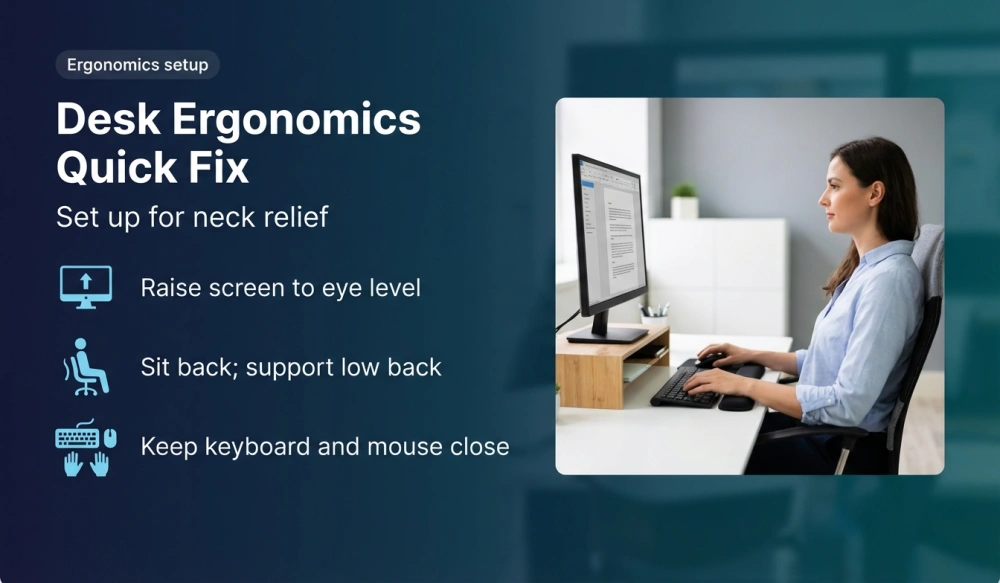
In Santa Ana and across Orange County, many people work in hybrid roles. If you split time between home and office in Irvine, Los Angeles, or National City, set up both spaces well. A consistent setup helps your body remember neutral posture and reduces daily adaptation stress [1].
What daily microbreaks and movement snacks help your neck?
Your neck likes variety. Brief microbreaks allow muscles to reset and circulation to improve. Ergonomics resources recommend short, frequent breaks to interrupt static postures during computer work [1] [2] [10]. Try this simple plan:
- Thirty to sixty second resets every twenty to thirty minutes. Stand up, roll your shoulders, look far away, and gently move your neck through pain free ranges.
- Five minute mobility breaks every hour. Walk to get water, climb stairs, or do a short mobility routine at the desk.
- Task rotation to vary posture. Alternate typing, meetings, calls, and standing work when possible.
- Visual breaks by looking at distant objects to reduce eye strain that can drive you forward toward the screen [1].
Set a gentle timer or use calendar reminders. Over time your body will cue you naturally. If movement increases pain, reduce the range, slow down, and seek help from a qualified professional such as a chiropractor in Santa Ana or a licensed physical therapist.
Which stretches for neck pain are safe and how should you perform them?
Stretches should feel relieving and should never reproduce sharp pain or numbness. Evidence based guidelines for neck pain support mobility work matched to your presentation, performed within comfortable limits, and combined with active exercise for longer term benefit [3] [5].
Here are gentle options most people tolerate well. If any movement causes radiating symptoms into the arm or face, stop and get an evaluation:
- Chin nods. Sit tall. Gently draw your chin straight back as if making a double chin. Hold three seconds, relax. Repeat ten times. Aim for a smooth motion without tilting the head up or down [3].
- Upper trapezius stretch. Sit tall and hold the seat with the right hand. Gently tilt your head left to stretch the right side of the neck. Hold twenty to thirty seconds. Breathe. Switch sides. Repeat two to three rounds [3].
- Levator scapulae stretch. Turn your head forty five degrees to the left, then nod down toward your armpit. Use the left hand lightly to guide a comfortable stretch along the back of the neck. Hold twenty to thirty seconds, switch sides [3].
- Pec doorway stretch. Place forearms on the sides of a doorway with elbows just below shoulder height. Step through until you feel a chest stretch. Hold thirty seconds and breathe. This supports better shoulder position during typing [1] [10].
Perform stretches one to two times daily on workdays. Gentle consistency usually beats occasional long sessions. Combine with posture breaks to reduce the build up of tension through the day [3].
How do strengthening and motor control exercises support the cervical spine?
Strength and motor control help the neck hold neutral posture with less effort. Clinical guidelines support a combined approach that includes deep neck flexor activation, scapular strengthening, and thoracic mobility to reduce pain and improve function in many people with neck pain [3]. Examples you can try after a professional screens your specific needs include:
- Deep neck flexor training. Lie on your back with a small towel under the head. Perform gentle chin nods and hold five to ten seconds without lifting the head. Start with five to eight repetitions. This targets endurance more than intensity [3].
- Scapular retraction and depression. With a resistance band, pull the shoulder blades back and down without shrugging. Three sets of eight to twelve repetitions build support for the neck during typing [3].
- Thoracic extension over a towel. Place a rolled towel across the upper back while lying on the floor. Gently extend over it and breathe, arms supported. This counters the rounded posture common in long computer sessions [10].
- Standing row or face pull. Use a band anchored at chest or eye level. Keep the neck long and the ribs down. Progress slowly and focus on form.
The best plan is individualized. A chiropractor in Santa Ana can assess your movement, check joint and soft tissue mobility, and design a progression that fits your body and schedule [3].
When should you see a chiropractor in Santa Ana or nearby?
Consider an evaluation if your neck pain lasts more than two to three weeks despite self care, interrupts sleep or daily activities, or if you notice headaches that start at the base of the skull and wrap around to the temple. You should also seek prompt care if you feel numbness or tingling down the arm, weakness in the hand, or if you recently had a fall or collision. A clinician can rule out serious causes, address joint and soft tissue contributors, and help you plan ergonomic changes that fit your workstation. Primary care guidelines emphasize an initial evaluation that screens for red flags, followed by conservative care for most nontraumatic cases [5].
If you work in Santa Ana, Irvine, or Costa Mesa, proximity matters for follow up. If you commute between Orange County and Los Angeles or work in National City, plan care that fits your weekly routine. Consistency supports progress as much as the specific technique used.
How does chiropractic care approach tech neck and related headaches?
Chiropractic care for desk job neck pain usually includes several elements delivered in a patient centered way. The exact blend depends on your symptoms, goals, and health history. Common components include:
- Assessment to understand how your neck moves, where it is sensitive, and which daily tasks provoke symptoms. This guides a targeted plan.
- Manual therapy such as joint mobilization or manipulation and soft tissue techniques to reduce pain and improve mobility when indicated [3] [4].
- Therapeutic exercise to improve endurance and control of the deep neck and shoulder girdle, guided by clinical practice guidelines for neck pain [3].
- Ergonomic coaching to optimize your workstation and daily habits, often with simple equipment you already have at home or at the office [1] [10].
- Education so you understand what is happening and how to pace activity. Feeling confident in your plan is part of recovery [3] [5].
Many people also report tension type or cervicogenic headaches that respond when neck mobility and muscle balance improve. A focused plan can address both neck and head symptoms together [3] [5].
What does current research say about manual therapy and exercise for neck pain?
Research supports a multimodal approach. Clinical guidelines from a professional association recommend combinations of manual therapy and exercise for many presentations of neck pain, with dosing and techniques tailored to the individual [3]. A systematic review from a leading evidence group reports that manipulation and mobilization can provide short term pain relief for mechanical neck pain and that combining these methods with exercises may improve outcomes compared with either alone [4]. Primary care guidance also emphasizes self management and conservative therapies for most people, with imaging reserved for red flags or persistent neurologic deficits [5].
As always, high quality care means matching the intervention to your specific situation. What works for one person may not be the best starting point for another. A careful assessment guides this process and reduces trial and error.
How do texting and device habits affect neck and shoulder load?
Screen habits outside of work matter. Looking down at a phone for long periods keeps the neck in flexion and encourages rounded shoulders. Over a day, these repeated positions can add up. Ergonomic resources recommend lifting the device toward eye level, supporting the elbows on armrests or pillows, and using voice input when possible to reduce repetitive thumb and neck strain [2] [10].
Consider small habit swaps:
- Use stands or prop your phone on a shelf for video calls so your neck can stay neutral.
- Limit long reading sessions on the phone. Switch to a larger screen placed at eye level when you can [1].
- Alternate hands and change postures during long texting sessions to avoid holding one position for too long.
These simple changes reduce cumulative load on the cervical spine and can help your exercise and manual therapy gains last longer [1] [2].
What workplace and legal guidelines apply in California for ergonomics and chiropractic care?
California employers have responsibilities related to repetitive motion injuries. The Cal OSHA standard describes when an employer must implement a program to minimize such injuries, including elements like worksite evaluation and employee training [6]. While not every desk job triggers this standard, the spirit is clear. Evaluating tasks and providing basic ergonomics education can reduce risk. If you are in Orange County and notice a pattern of symptoms linked to your workstation, consider speaking with your employer about an ergonomics review.
Chiropractic in California is licensed and regulated by the state board. The board maintains laws and regulations that define scope, continuing education, standards of practice, and advertising requirements for licensed chiropractors [7]. When you seek care from a chiropractor in Santa Ana, Los Angeles, or National City, you can ask about licensure, training, and how your plan aligns with current evidence and state requirements. California residents also have the right to informed consent and to understand the risks, benefits, and alternatives to any proposed care. If needed, your chiropractor can coordinate with your primary care clinician to ensure safe and appropriate management, especially when symptoms suggest a condition that requires medical or surgical evaluation [5] [7].
How can you set up your desk at home for hybrid work in Santa Ana Los Angeles or National City?
Home offices vary widely. You might be working at a kitchen table in Santa Ana on Monday, a coworking desk in Los Angeles midweek, and a home workstation in National City on Friday. Apply simple rules everywhere to keep your neck happy [1] [10]:
- Start with the seat. Sit back fully and add a small cushion or rolled towel for lumbar support. Adjust seat height so feet rest flat or use a footrest substitute like a box.
- Raise the screen to eye level with a stack of books or a stable stand. Connect an external keyboard and mouse so your shoulders can relax.
- Bring tools close. Keep the keyboard and mouse near the desk edge. Avoid reaching forward for long periods.
- Light the space to reduce glare and squinting. If you are straining to see, you will tend to lean forward [1].
- Plan your movement. Put a water bottle across the room to cue regular walks and place a yoga mat nearby for quick mobility breaks.
If you share a space, create a fast reset routine. Ten seconds to adjust the chair, check screen height, and place the keyboard goes a long way toward neck comfort.
What are red flags that require urgent medical evaluation instead of self care?
While most desk related neck pain responds to conservative care, certain signs suggest a more serious problem. Seek urgent medical attention if you experience any of the following [5]:

- Severe trauma from a fall or collision or an inability to turn the head after an injury.
- Progressive weakness or loss of coordination in the hands or legs or new problems with balance or walking.
- Numbness or tingling that spreads or gets worse, especially if it follows a nerve pattern into the arm and hand.
- Fever, unexplained weight loss, night sweats, or a history of cancer or infection along with neck pain.
- Severe headache with neurological changes such as vision loss, slurred speech, or facial droop.
If any of these apply, call your primary care clinician or seek emergency care. For nonurgent but persistent symptoms, schedule an evaluation with a qualified provider such as a chiropractor in Santa Ana or your family physician.
How can sleep position and pillow choice affect morning stiffness?
Morning stiffness is common when the neck rests at an awkward angle for hours. Many people do well with side or back sleeping using a pillow that keeps the neck in line with the spine. If you wake with pain on one side, test a slightly taller pillow on that side to fill the space between the shoulder and the neck. If you sleep on your back and feel pressure, try a smaller pillow that supports the curve of the neck without pushing the head forward. Gentle stretching before bed and a short set of deep neck flexor holds can also prepare tissues to relax during sleep [3] [8].
If pain wakes you regularly or you have numbness or tingling at night, get an evaluation. A clinician can check for nerve irritation, shoulder involvement, or habits that might contribute to symptoms [5].
How can you track progress and know your plan is working?
Improvement is often gradual. Track a few simple markers for two to four weeks:
- Pain levels during and after the workday using a zero to ten scale.
- Work tolerance measured by how long you can work before you need a break.
- Range of motion such as how easily you can shoulder check while driving.
- Headache frequency and intensity if headaches are part of your pattern.
If your markers are trending in the right direction, keep going. If progress stalls or pain increases, consult a professional. Clinical guidance supports adjusting elements like exercise dose, manual therapy, and education based on response rather than following a fixed template [3] [5].
How does One and Only Chiropractic support patients with tech neck in Santa Ana Los Angeles and National City?
At One & Only Chiropractic, we help people across Santa Ana, Los Angeles, and National City understand what drives their neck pain and what to do next. Our team focuses on evidence based, minimally invasive care that blends manual therapy, targeted exercise, and practical ergonomics coaching so you can move better at work and at home [3] [4] [1].
- Where we operate. We serve patients in Santa Ana and greater Orange County with accessible options for those commuting to Los Angeles or traveling to National City. Same week appointments are often available so you can start making changes sooner.
- Our approach. We begin with a clear assessment of your posture, movement, and workstation. We then build a plan with you that includes joint and soft tissue care when appropriate, progressive neck and shoulder strengthening, and a tailored break and movement routine based on your workday [3].
- Tools and processes. We use simple screening tools and movement tests to identify your main drivers. Many patients benefit from a brief video walkthrough of their desk setup and a written summary with quick wins drawn from OSHA and university ergonomics guidance [1] [10].
- Leadership and experience. Dr. Hirbod Azizi and the One & Only Chiropractic team bring years of combined experience working with desk professionals, students, and manual workers. We stay current with clinical guidelines and research to keep your plan aligned with what works [3] [4].
- Personalized service. You have direct access to a qualified clinician who listens to your goals and constraints. We adapt care to your schedule, your equipment, and your tolerance so you can apply changes immediately.
- Real world results. Patients often report fewer afternoon headaches, more comfortable commutes, and improved focus within the first few weeks. While individual results vary, combining exercise, ergonomics, and manual care tends to produce steady, meaningful gains for many patients [3] [4].
- Next steps. If you are ready to start, call us at (949) 800 8525 to schedule an assessment. If you prefer, begin with a workstation consult to set up your desk for success, then add exercise and manual care as needed.
We are committed to education. Even if you are not sure you need care, we are happy to answer questions and help you decide on the right first step. If your presentation suggests medical evaluation, we will coordinate with your primary care clinician in line with California regulations and good practice [5] [7].
What questions do people in Orange County ask most often about tech neck?
Can tech neck cause headaches that start at the base of the skull?
Yes. Irritation of upper cervical joints and muscles can refer pain to the back of the head and around the temple area. Addressing posture, neck mobility, and deep neck flexor endurance often helps reduce headache frequency and intensity [3] [5].
Is it better to sit or stand if my neck hurts during work?
Both can be helpful. The key is to vary position. A sit stand setup can reduce time spent in any single posture. Keep your screen at eye level in both positions and continue to take microbreaks for movement and eye rest [1] [10].
Do I need imaging for desk job neck pain?
Most people with nontraumatic neck pain do not need imaging at the start. Primary care guidance supports a careful evaluation first and reserves imaging for red flags or persistent neurological deficits [5].
Which pillow should I buy to help with morning stiffness?
Choose a pillow that keeps your neck aligned. Side sleepers often prefer a taller pillow, while back sleepers often prefer a slimmer pillow with gentle neck support. The most important factor is comfort and alignment rather than a specific material [8].
Can spinal manipulation help tech neck?
Manual therapy, including manipulation or mobilization, can reduce pain and improve mobility for some people with mechanical neck pain. Outcomes often improve further when combined with specific exercises and education [3] [4].
How long until I notice changes if I start stretches and ergonomic fixes today?
Many people notice easier motion and less stiffness within one to two weeks, especially if they add frequent microbreaks and basic strengthening. Meaningful changes in endurance and posture often take four to eight weeks of consistent practice [3] [10].
What if I work in Santa Ana and also drive to Los Angeles several days a week?
Plan movement into your commute. Adjust the car seat so your head is close to the headrest, take a brief walk before getting on the road, and do a simple neck mobility routine after you park. These small habits help offset long periods of sitting.
Can children and teens get tech neck from school and phones?
Yes. Increased device use and long study sessions can lead to similar patterns in younger people. Emphasize frequent breaks, bring screens up to eye level, and add daily activity. If pain persists, seek an evaluation to rule out other causes and to set up a plan that fits their age and activities [2].
Where can you find the sources and references used in this guide?
- Computer Workstations eTool – OSHA
- Ergonomics and Musculoskeletal Disorders – CDC NIOSH
- Neck Pain Revision 2017 Clinical Practice Guidelines – JOSPT
- Manipulation and mobilisation for neck pain – Cochrane Review
- Neck Pain Initial Evaluation and Management – American Family Physician
- Section 5110 Repetitive Motion Injuries – Cal OSHA
- Laws and Regulations – California Board of Chiropractic Examiners
- Neck Injuries and Disorders – MedlinePlus
- Neck pain summary 2019 – Institute for Health Metrics and Evaluation
- Ergonomic Guidelines for Computer Workstations – Cornell University Ergonomics Web
- Office Ergonomics – University Health Services Berkeley
About the Author